
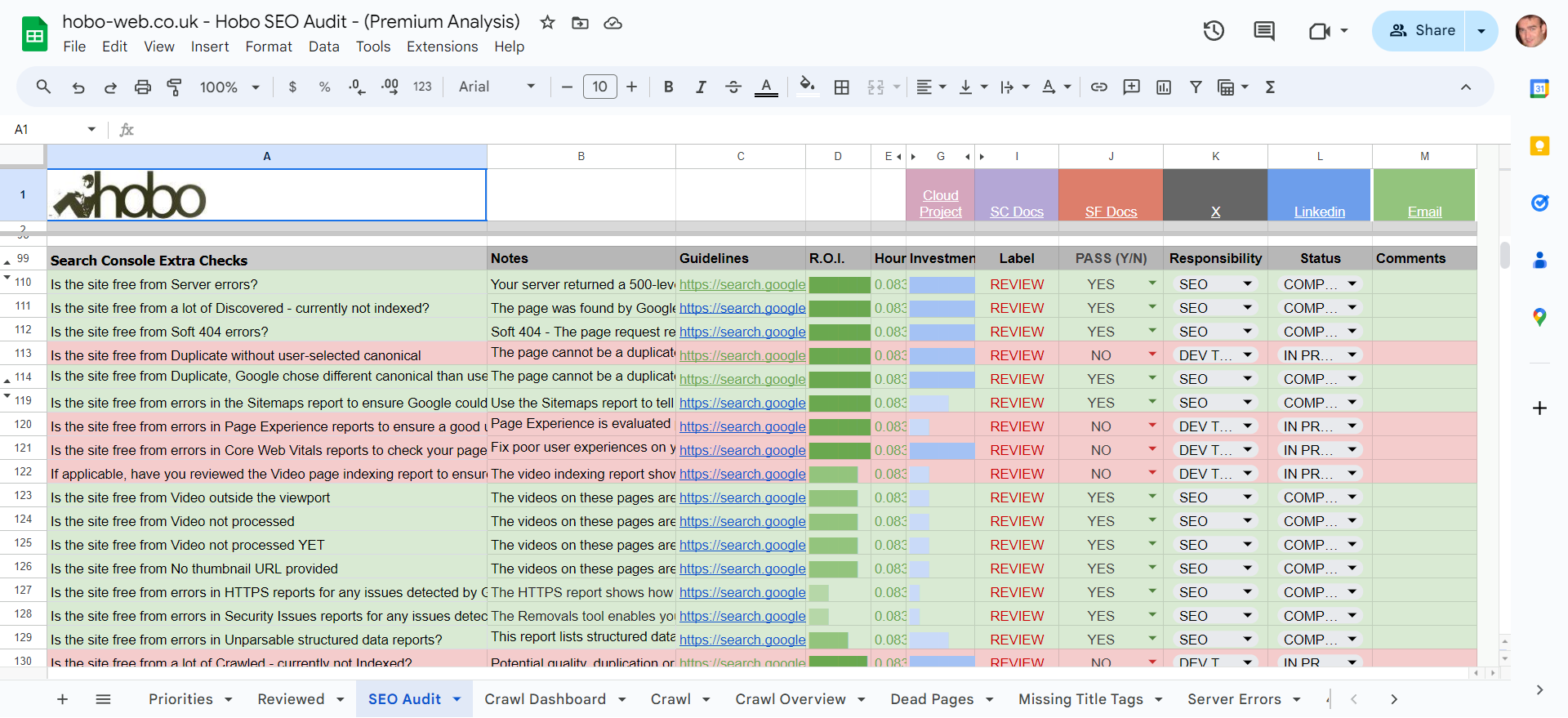
SEO Site Audit: A Practical Guide to Improving Your Website
An SEO site audit is a structured review of a website’s ability to be found, crawled, understood and ranked by search engines. It can reveal technical problems, gaps in content and opportunities to improve the experience for visitors.
An audit is not simply a list of errors to fix. It helps you understand which issues matter most, why they matter and what to do next. Whether you manage a small business website or a large online shop, a regular audit can help keep your SEO efforts focused and effective.
What does an SEO site audit cover?
A thorough audit looks at several areas that can affect organic search performance:
- Technical SEO: How search engines access, crawl and index your pages.
- On-page SEO: The content, headings, titles and internal links on individual pages.
- Content quality: Whether pages are useful, accurate, relevant and distinct.
- Website experience: How quickly and easily visitors can use the site, particularly on mobile devices.
- Authority and links: The quality and relevance of links pointing to your website.
- Measurement: Whether analytics and search performance data are available and configured appropriately.
Why carry out an SEO audit?
Websites change over time. New pages are added, old content becomes outdated, redirects are introduced and technical settings can be altered. These changes may create problems that are difficult to spot during everyday site management.
An audit can help you:
- Find pages that search engines cannot crawl or index.
- Identify broken links, redirect chains and other technical issues.
- Improve page titles, headings and descriptions where they are unclear or missing.
- Find overlapping or outdated content.
- Make important pages easier for visitors and search engines to discover.
- Prioritise work based on likely impact and effort.
How to carry out an SEO site audit
Check how your site is indexed
Start by reviewing which pages search engines can access and index. Check your robots.txt file, XML sitemap and indexing directives, such as noindex tags. These settings can affect whether pages appear in search results.
Compare the pages you intend to have indexed with the pages reported in tools such as Google Search Console. Differences are not always a problem, but unexpected exclusions or indexed pages that should be private deserve investigation.
Review crawling and site structure
Make sure important pages can be reached through clear navigation and internal links. A logical structure helps visitors find information and helps search engines understand how pages relate to one another.
Look for orphan pages, which have no internal links pointing to them, as well as unnecessary redirect chains, broken links and pages that require several clicks to reach. Give priority to pages that support your key services, products or business goals.
Assess page speed and mobile usability
Check how your website performs on mobile devices as well as desktop. Pages should be readable and usable on smaller screens, with controls that are easy to tap and content that does not require awkward horizontal scrolling.
Use performance tools to identify issues such as oversized images, excessive scripts or slow server responses. A single score does not tell the whole story, so review the actual user experience and focus on changes that make pages faster and easier to use.
Review on-page elements
Check that each important page has a clear, descriptive title and a useful main heading. Headings should organise the content rather than simply repeat keywords. Page descriptions should accurately summarise the page and encourage relevant searchers to visit.
Also review image alt text where images convey information, and make sure internal links use helpful, descriptive wording. Avoid adding keywords where they do not read naturally or help the visitor.
Evaluate content quality
Ask whether each page provides a clear benefit to its intended audience. Is the information accurate and up to date? Does the page answer the questions a visitor is likely to have? Is it substantially different from other pages on your site?
Where several pages cover very similar topics, consider whether they should be improved, combined or kept separate for distinct audiences. Avoid removing content solely because it receives little traffic; first consider its purpose, value and relationship to other pages.
Check links and redirects
Review links to and from your site for relevance and quality. Internally, make sure important pages receive useful links from related content. Externally, assess whether links come from credible, relevant sources rather than relying on large numbers of low-quality links.
Check that redirects lead to the most appropriate destination and do not form long chains. Broken links should be repaired or redirected where a suitable replacement exists.
Confirm tracking and reporting
Reliable measurement helps you understand whether changes are making a difference. Check that your analytics platform and search performance tools are set up correctly, and that key actions—such as enquiries or purchases—are being measured where appropriate.
Use a baseline before making significant changes. This makes it easier to compare performance afterwards and separate meaningful trends from normal fluctuations.
How to prioritise audit findings
Not every issue needs immediate attention. A practical audit groups findings by severity, impact and effort. For example, a configuration error that prevents important pages from being indexed may deserve urgent attention, while a minor wording improvement can usually wait.
For each finding, record:
- The page or section affected.
- What the issue is and how it was identified.
- The potential effect on visitors or search visibility.
- The recommended action.
- Who will complete the work and when.
This turns an audit into a workable plan rather than an unmanageable list of technical observations.
How often should you audit your website?
The right frequency depends on the size and complexity of your website and how often it changes. Many businesses benefit from a broader review at least once or twice a year, alongside regular checks of search performance and technical alerts.
Consider a dedicated audit after a website redesign, migration, major change to navigation or a significant drop in organic traffic. Smaller, ongoing checks can help catch issues before they affect large parts of the site.
Common SEO audit mistakes
- Fixing every warning automatically: Tools can flag issues that are harmless or irrelevant in context. Review each finding before acting.
- Focusing only on technical SEO: A technically sound site still needs useful content and a clear experience for visitors.
- Making changes without a baseline: Record current performance so you can assess the effect of your work.
- Chasing keyword density: Write naturally for people and use relevant terms where they genuinely help explain the page.
- Ignoring business priorities: Focus first on pages and issues connected to your audience and objectives.
Make your audit useful
A good SEO site audit combines technical checks with a thoughtful review of content and user experience. Its purpose is not to make a website perfect according to a tool, but to identify practical improvements that help people find and use the information they need.
By documenting findings, prioritising the most important work and reviewing the results, you can make your audit a valuable part of an ongoing SEO programme.
5 Key Benefits of an SEO Site Audit
- Finds technical issues that affect search visibility.
- Improves site structure and crawlability.
- Highlights content gaps and duplication.
- Enhances user experience across devices.
- Helps prioritise SEO improvements.
Seven Potential Drawbacks of an SEO Site Audit
- Can be time-consuming.
- May require specialist tools.
- Findings can be difficult to interpret.
- Tool reports may include false alarms.
- Fixes can require developer support.
- Results are not guaranteed.
- Audits need regular updating.
Finds technical issues that affect search visibility.
An SEO site audit can uncover technical issues that prevent search engines from crawling, understanding or indexing important pages. Problems such as broken links, incorrect redirects, blocked pages or missing sitemap entries can limit your visibility in search results. Identifying and resolving these issues helps search engines access your content more reliably, giving your pages a better opportunity to appear for relevant searches.
Improves site structure and crawlability.
An SEO site audit can reveal where your website’s structure makes important pages difficult to find or crawl. By reviewing navigation, internal links, redirects and page hierarchy, you can make it easier for visitors to move around your site and for search engines to discover and understand its content. A clearer structure helps ensure that valuable pages are not overlooked and supports more effective indexing.
Highlights content gaps and duplication.
An SEO site audit can highlight content gaps by showing where your website does not yet answer the questions your audience is searching for. It can also uncover duplicate or very similar pages that may confuse visitors and make it harder for search engines to identify the most relevant result. Addressing these issues helps you plan useful new content, improve existing pages and give each page a clearer purpose.
Enhances user experience across devices.
An SEO site audit can enhance the user experience across devices by highlighting issues such as slow-loading pages, difficult navigation, small text and layouts that do not adapt well to mobile screens. Fixing these problems makes a website easier to use on phones, tablets and computers, helping visitors find what they need and complete tasks with less effort. A smoother experience can also support stronger engagement and encourage people to return.
Helps prioritise SEO improvements.
An SEO site audit helps you prioritise improvements by showing which issues are most likely to affect your website’s visibility and visitors. Rather than tackling every recommendation at once, you can focus first on high-impact problems—such as pages that cannot be indexed or important links that are broken—then plan less urgent changes around your time and resources. This makes SEO work more manageable and helps direct effort towards the improvements that matter most.
Can be time-consuming.
An SEO site audit can be time-consuming, particularly for large or complex websites with hundreds or thousands of pages. Reviewing technical settings, content, links and performance takes careful analysis, and the work does not end with identifying issues: findings must also be prioritised, shared with the right people and addressed. Without a clear scope, an audit can become an extensive checklist that delays the improvements most likely to make a difference.
May require specialist tools.
An SEO site audit may require specialist tools to uncover issues such as crawl errors, indexing problems, broken links and page-speed bottlenecks. Some tools offer free features, but more detailed analysis often requires paid subscriptions or technical expertise to interpret the results. This can add to the cost and make a comprehensive audit more challenging for businesses without in-house SEO support.
Findings can be difficult to interpret.
SEO site audit findings can be difficult to interpret, particularly when reports use technical language or flag issues without explaining their real-world impact. A long list of warnings may make it hard to tell which problems could affect search visibility and which are minor or irrelevant to your website. Without the right expertise, there is also a risk of prioritising low-impact fixes or making changes that do not address the underlying issue. Clear explanations and a prioritised action plan can help turn audit results into practical next steps.
Tool reports may include false alarms.
SEO audit tools are useful for spotting potential issues, but their reports can include false alarms. A warning may not reflect how your website actually works, or may flag something that is irrelevant to your goals. Review each finding in context before making changes, and prioritise issues based on their real impact on visitors and search visibility.
Fixes can require developer support.
Some SEO audit findings, such as problems with site speed, structured data, redirects or indexing, may need changes to the website’s code or server configuration. This can mean involving a developer, which may add cost, create delays or compete with other technical priorities. To make the process smoother, describe each issue clearly, explain its likely impact and agree on the work and timescale with your development team.
Results are not guaranteed.
An SEO site audit can identify issues and recommend improvements, but it cannot guarantee higher rankings, more traffic or increased sales. Search results are influenced by many factors, including competition, changes to search engine algorithms and how effectively recommendations are implemented. An audit is best viewed as a roadmap for improvement, rather than a promise of specific results.
Audits need regular updating.
SEO site audits are not a one-off task: websites, search engine guidelines and competitors change over time, so audit findings can quickly become outdated. New pages, technical updates or changes to your site’s structure may introduce issues that were not present during the previous review. This means audits need to be revisited regularly, which takes time and resources to ensure recommendations remain relevant and effective.