
What Does On-Page SEO Include?
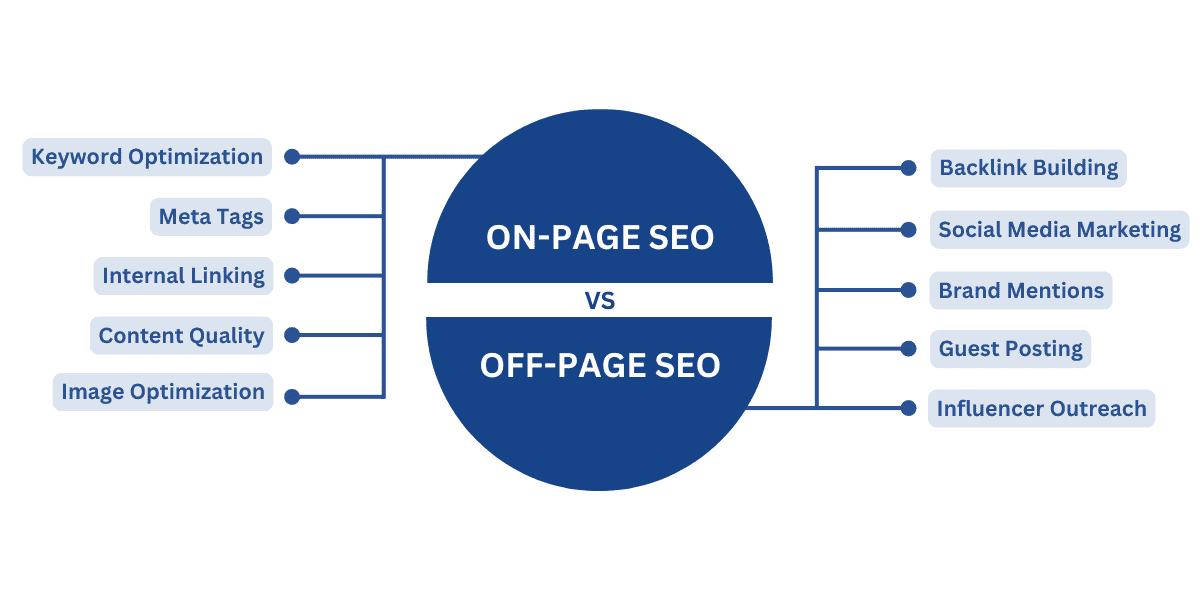
On-page SEO includes the improvements made to a website’s pages to help search engines understand their content and help visitors find the information they need. It covers elements such as page content, title tags, headings, internal links and images, as well as aspects of usability and page experience.
Effective on-page SEO is not simply a matter of adding keywords. Each page should be useful, easy to navigate and clearly focused on the needs behind a search. Here are the main elements to consider.
Search intent and keyword research
Before writing or updating a page, identify what people are looking for and the questions they want answered. Keyword research can reveal the words and phrases people use, but search intent helps determine the kind of page that is likely to satisfy them.
For example, someone searching for “how to clean a wool coat” is probably looking for practical instructions, while someone searching for “wool coat” may want to compare products. Aligning the page with this intent gives it a clearer purpose.
High-quality page content
Useful, accurate and original content is at the heart of on-page SEO. A page should address its subject thoroughly enough to help its intended audience, while remaining clear and easy to read. Use relevant terms naturally, but avoid repeating keywords simply to influence rankings.
Depending on the topic, helpful content may include explanations, examples, step-by-step instructions, comparisons or answers to common questions. Keep information up to date, and make claims that can be supported.
Title tags and meta descriptions
The title tag is the page title that may appear in search results and browser tabs. It should describe the page accurately and make its subject clear. A distinctive, relevant title can also encourage people to choose your result.
A meta description summarises the page and may appear beneath its title in search results. It is not generally a direct ranking factor, but a clear and appealing description can help searchers decide whether the page is right for them.
Headings and page structure
Headings organise content into sections, making a page easier to scan for both readers and search engines. Use one clear main heading, usually an <h1>, followed by descriptive subheadings such as <h2> and <h3> where appropriate.
Headings should describe the content that follows them. They are not just a place to insert keywords, and they should follow a logical order.
URLs
A good URL is concise, readable and relevant to the page. Clear URLs can help visitors understand what a page is about before they open it. Avoid unnecessarily long strings, confusing parameters and frequent URL changes. If a URL must change, set up an appropriate redirect to preserve access to the original page.
Internal links
Internal links connect one page on your website to another. They help visitors discover related information and can help search engines understand how your pages fit together.
Use descriptive link text so people know what to expect when they click. Link to relevant pages where it is genuinely useful, rather than adding links for their own sake.
Images and other media
Images, video and diagrams can make a page more useful and engaging. For images, use relevant file names and provide concise alternative text when the image conveys meaningful information. Alternative text also supports people using screen readers.
Large image files can slow a page down, so resize and compress them where appropriate. Use suitable formats and avoid adding media that does not improve the page.
Structured data
Structured data is code that can give search engines additional information about a page, such as whether it contains a product, an organisation or an event. It should accurately reflect the visible content on the page. Structured data may make a page eligible for enhanced search results, but it does not guarantee that those features will appear.
Usability and page experience
On-page SEO also involves making pages straightforward to use. Content should be readable on mobile devices, important information should be easy to find, and interactive elements should work as expected. Fast loading and a stable page layout can contribute to a better experience, although performance and site-wide technical improvements may also fall under technical SEO.
What on-page SEO does not mean
On-page SEO is not keyword stuffing, hiding text or copying content from other websites. These practices can make pages less useful and may harm your site. Nor does every SEO task take place on the page: activities such as earning links from other websites are usually considered off-page SEO, while crawling and indexing issues are generally part of technical SEO.
A practical on-page SEO checklist
- Make the page’s purpose and search intent clear.
- Write useful, original and accurate content.
- Create a relevant title tag and meta description.
- Organise the content with clear headings.
- Use a concise, descriptive URL.
- Add helpful internal links with clear link text.
- Optimise images and provide suitable alternative text.
- Check that the page is readable and usable on mobile.
- Use structured data only when it accurately describes the page.
- Review and update the page when its information becomes outdated.
In summary
On-page SEO includes the content and page-level improvements that make a website easier to understand, navigate and use. By combining useful information with clear titles, headings, links and media, you can create pages that serve visitors well and give search engines stronger context about their content.
7 Essential On-Page SEO Tips for Optimising Your Website
- Use your target keyword naturally in the page title.
- Write a clear, unique meta description.
- Structure content with descriptive headings.
- Keep URLs short and readable.
- Add useful alt text to images.
- Link to relevant pages on your site.
- Make pages mobile-friendly and fast.
Use your target keyword naturally in the page title.
Include your target keyword naturally in the page title to make the subject of the page clear to both visitors and search engines. Keep the title accurate and readable, rather than forcing in repeated or awkward wording. A clear, relevant title can help people decide whether your page matches what they’re looking for.
Write a clear, unique meta description.
Write a clear, unique meta description for every important page on your website. It should accurately summarise the page and give people a reason to visit, using natural language rather than a list of keywords. Search engines may choose to show different text in results, but a relevant description can help users decide whether your page matches what they’re looking for.
Structure content with descriptive headings.
Structure your content with descriptive headings to make each page easier to scan and understand. Use one clear main heading, followed by subheadings that accurately describe the sections beneath them. A logical heading hierarchy helps readers find the information they need and gives search engines useful context about the page—without forcing keywords where they don’t fit.
Keep URLs short and readable.
Keep URLs short and readable so visitors can quickly understand what a page is about. Use clear, relevant words, separate them with hyphens and leave out unnecessary numbers or parameters where possible. A descriptive URL can make links easier to recognise and share, while also giving search engines useful context about the page.
Add useful alt text to images.
Add useful alt text to images so people using screen readers can understand the information they convey. Describe the image briefly and accurately, focusing on details that are relevant to the page. For decorative images that add no meaningful information, use empty alt text so assistive technology can skip them. Avoid cramming in keywords: alt text should help people, not serve as a list of search terms.
Link to relevant pages on your site.
Link to relevant pages on your site to help visitors discover useful related information and make it easier for search engines to understand how your content connects. Use clear, descriptive link text that tells readers what they can expect, and only add links where they genuinely help the page’s audience.
Make pages mobile-friendly and fast.
Make your pages mobile-friendly and fast so visitors can find and use information easily, whatever device they’re on. Use responsive layouts, readable text and buttons that are simple to tap, and optimise images and other files to reduce loading times. A smooth mobile experience helps keep people engaged and supports your wider on-page SEO efforts.